
Skip to content

  • Home
  • Shared Hosting
  • WordPress Hosting
  • VPS Hosting
  • Web Development
  • Email Hosting
  • Toggle search form

How to complex shipping options in WooCommerce

Posted on September 4, 2025September 4, 2025 By wingshoster No Comments on How to complex shipping options in WooCommerce

Set Up Shipping Zones and Methods (Built-in)

WooCommerce lets you define shipping zones (e.g., countries, states, postal codes) and assign methods:

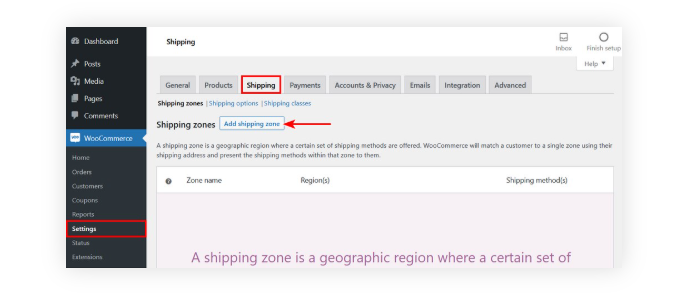
  1. Go to WooCommerce → Settings → Shipping
  2. Add Shipping Zones (e.g., “US East Coast,” “California,” “Europe”)
  3. Assign methods to each zone (Flat Rate, Free Shipping, Local Pickup).
  4. For Flat Rate, you can define base costs and per-item, per-class fees.

🔹 Example: $5 flat + $1 per item for California, $10 flat for New York.

Use Shipping Classes (Per Product or Category Pricing)

If certain products require different rates (e.g., fragile items, bulky items):

  1. Go to WooCommerce → Settings → Shipping → Shipping Classes
  2. Create classes like “Heavy”, “Fragile”, “Standard”
  3. Assign classes to products.
  4. In Flat Rate settings, configure costs per shipping class.


Add Conditional Logic (Plugins)

The built-in tools are limited. For complex rules, use plugins:

  • Table Rate Shipping for WooCommerce (official)
  • Set rules by weight, item count, subtotal, or destination.
  • Example:
    • 0–5 kg → $10
    • 5–10 kg → $20
    • Orders over $100 → Free shipping
  • Flexible Shipping (WP Desk) – Great for tiered or advanced logic.
  • Conditional Shipping and Payments – Restrict certain methods based on products, user roles, or cart contents.


cPanel, wordpress

Post navigation

Previous Post: How to Manually Add a WordPress Theme via Dashboard or FTP
Next Post: Migration Made Simple: How to Move Your Website Without Downtime

Leave a Reply Cancel reply

Your email address will not be published. Required fields are marked *

Categories

  • cPanel
  • Uncategorized
  • wordpress

Recent Posts

  • From Zero to Launch: How Wingshoster Builds, Hosts, Secures, and Supports Modern Websites in 2025
  • Migration Made Simple: How to Move Your Website Without Downtime
  • How to complex shipping options in WooCommerce
  • How to Manually Add a WordPress Theme via Dashboard or FTP
  • How to Deploy a WordPress® Site With cPanel

Recent Comments

No comments to show.

Wingshoster is a Web Hosting Company Providing Cheap and Fastest Reliable Hosting Services to Businesses and Individuals.The Wingshoster team is committed to bringing you unbiased high speed hosting with many security feature independence. We use highly skilled, strategic with latest methodologies and expert insights to making the best services for your business journey and individual.

Copyright © 2025 .Wingshoster